All topics
The network drive
Files and websites
Cameras and sensors
Camera Feeds
A camera feed shows the camera of the server device in a web browser. You can watch it live, let it watch for movement and keep short clips, and be notified when something happens, with Pro.
Adding a feed
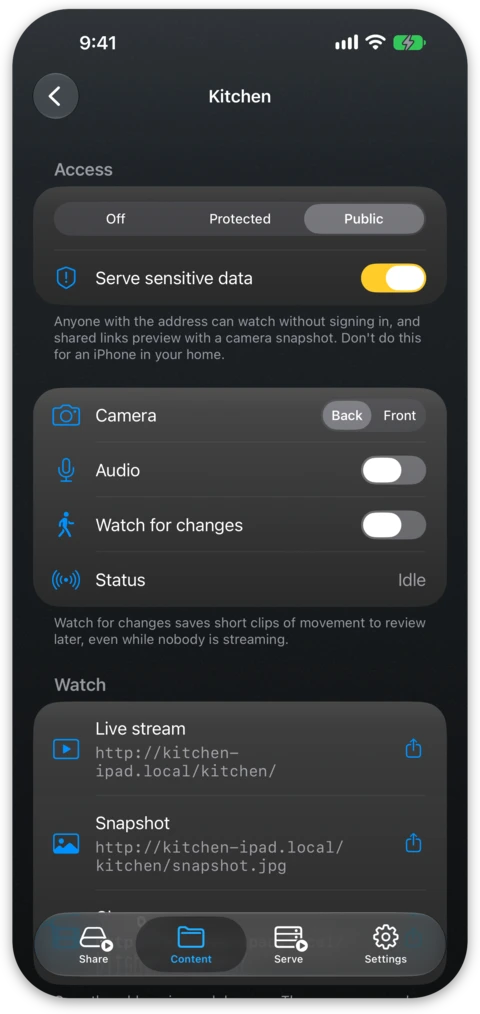
On the Content tab, choose New Camera Feed… and give it a name. A feed sits next to your folders, though it holds no files and so appears neither on the network drive nor as an S3 bucket. Names come from the same list as folders and repositories, so each name is unique across the tree.
On the screen of the feed you pick the back or front camera, turn audio on or
off, and get three addresses to open or share: the live view, a still
snapshot.jpg and the Changes page. A Mac uses its built-in camera, or an
iPhone docked as a Continuity Camera. The status line says whether the camera is
Live, Watching, Idle or Stopped. Since a phone lying flat sees the ceiling, a
printable stand holds it upright while it charges
and aims it at the room.
Watching
Open the address in any browser. The page and the video come from the device alone.
The camera starts when the first viewer arrives and stops within about twenty seconds of the last one leaving. One feed is live at a time. On a protected feed a stream address stops working once it has been idle, and after twelve hours at the latest, so you can share one without it becoming a permanent window.
Quality follows the slowest viewer and drops while the device is warm. An
iPhone or iPad with an A12 chip or newer, or a Mac with Apple silicon, instead
sends a viewer on a slow connection a second, smaller picture, unless Low
Power Mode is on. On an
https address you are about a second and a half behind the camera, and
further behind on a plain http address, where Apple's player will not use the
low-latency parts.
Watching for changes
Turn on Watch for changes and the camera keeps running at reduced quality, looking for movement. Each time something moves it saves a clip beginning a few seconds before the movement, so you see how it started. Keep clips decides how much history to hold, from two days and 200 MB up to thirty days and 20 GB, and old clips make room for new ones.
Clips are listed on the feed's Changes page and play there, each with a picture, a time and a length. The page also shows when the camera was not watching, such as while someone viewed another feed or the device was cooling down. On an iPhone or iPad with an A12 chip or newer, or a Mac with Apple silicon, clips showing a person or a pet are labeled.
The Changes page requires signing in with a device account even on a feed anyone may watch, and clips are kept outside your folders where no network client reaches them. A watching camera is a running camera, so the green camera indicator stays on.
Notifications
While Watch for changes is on, the live view has a bell for viewers who signed in, and the Changes page has a Get Notifications button. Turn one on in a browser and you are notified each time a clip is saved, with the name of the camera, the time, "person" or "pet" when known, and a link to the clip, while the picture itself stays on the device.
You get at most one notification per camera per minute, and a device that was
offline gets the latest one rather than a stack if it is back within ten
minutes. Notifications need the
https address. On iPhone and iPad they work only from a Home Screen web app:
open the Changes page in Safari, choose Share and Add to Home Screen, then
open it from there and turn notifications on.
Who can watch
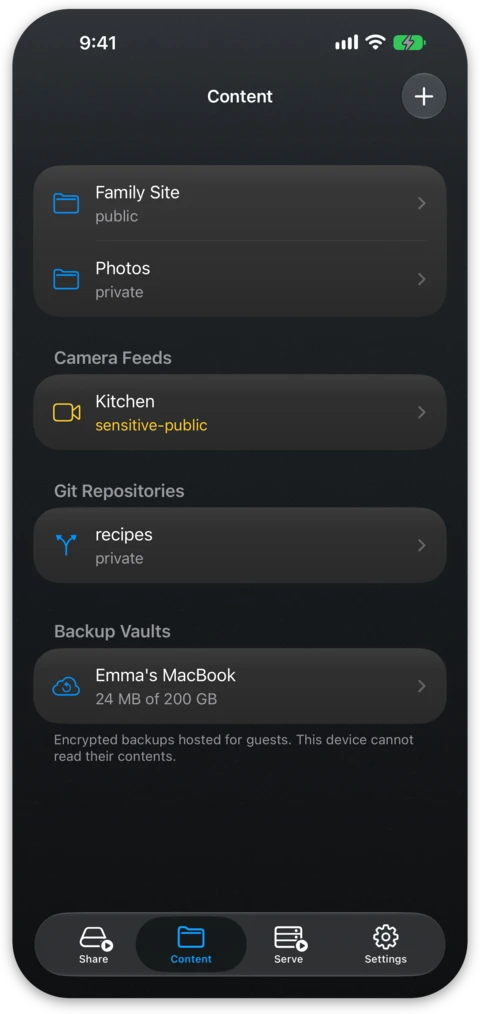
A feed is Off, Protected or Public.
- Off: the address answers nothing. New feeds start here.
- Protected: viewers sign in with a device account, which is the right choice indoors.
- Public: anyone with the address can watch, and links to it preview with a snapshot.
A public feed starts streaming once you also turn on Serve sensitive data for it. Until then the address answers that the camera is not published and offers no snapshot. On the Content tab a public feed serving sensitive data is marked in the warning colour.
An account narrowed to part of the server can be given some feeds and kept from others. A feed outside its scope answers as if it did not exist.
Free and Pro
Camera feeds need Pro, and that covers all of it: the live view, watching for changes, the clips and the notifications. Without Pro, New Camera Feed… offers the purchase instead of creating a feed.
Feeds made during the trial keep their settings and stop serving. The address says that nothing is streaming and the camera stops watching. Clips already recorded stay on the device, and the Changes page keeps serving them to anyone who signs in. Buying Pro brings the feeds back as they were, clips included.