All topics
The network drive
Files and websites
Cameras and sensors
Access Keys and S3 Clients
NAS Reborn speaks the standard S3 protocol, so ordinary S3 tools work with it. Access keys are the whole access model, one per client, each revocable separately.
One rule
A request is allowed when it reads from a public folder, or when it carries a valid signature from one of your access keys that reaches that folder. A new key reaches everything, so you usually create several keys for the sake of revocation. Give each client its own labeled key and you can cut one client off later without touching the others.
Scoping a key
You can also narrow a key to part of the tree. On the screen of the key, turn All folders off and tick the folders it may sign for. The list starts out with everything that exists right now, so switching it off takes nothing away on the spot. A folder created later stays out until you tick it as well.
Folders outside a key's scope are missing as far as that key can tell. The
folder answers 404 NoSuchBucket, it is missing from a bucket listing, and
creating a bucket of that name is refused, so a scoped key cannot make a
folder it would then be unable to see. A refusal would confirm that the
folder exists, so the answer is the one an unknown folder gets.
Scoping works on every key, with or without Pro.
Managing keys
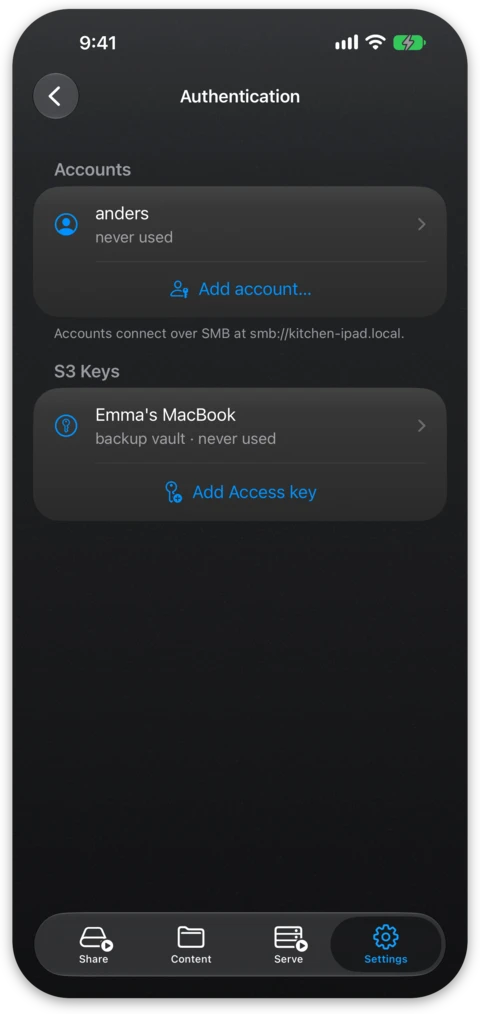
- A fresh install comes with one key labeled "admin key". You create more in Settings → Authentication, where each key gets an ID and a secret ready to paste into a client, and a label naming the client it is for.
- Each key shows when it was last used, which makes it easy to spot stale keys that are safe to revoke.
- To reveal a stored secret again you need Face ID, Touch ID or the device passcode.
- The free tier includes one key and more come with Pro.
S3 Files: scan a code
S3 Files, from the same developer, puts S3
buckets in the Files app and Finder, and NAS Reborn configures it on another
device without any copy-pasting. On the detail screen of a folder, tap Add
to S3 Files… and pick the key that device should use, either one of
your keys that reaches the folder or New access key…. The server then asks
for Face ID, Touch ID or the device passcode and shows a pairing
code. Scan it with the camera of the iPhone or iPad running S3 Files, or
send the link below the code to a Mac with the share button. The link opens a
page served by NAS Reborn, and its button hands the address, the key and the
server's certificate to S3 Files. The key's secret stays in the part of the link
after #, which a browser keeps to itself.
Pairing needs Serve turned on and both devices on the same network, because the other device fetches the page from the server directly. The code counts down from two minutes and stops working when you leave its screen. When a device connects with it, the screen confirms and closes, and you open it again to add the next device. When the code carries an IP address for the server, the screen says so, and you pair again if that address changes.
A key made with New access key… is labeled "S3 Files" and is saved the first time a device signs in with it. Every device paired with a key shares it, so deleting or switching off that key in Settings → Authentication disconnects all of them. The free tier includes one key, the "admin key" a fresh install comes with, so without Pro you pair with that one.
rclone
The server is path-style, so the bucket name goes in the path rather than in
the hostname. This rclone configuration works:
[nasreborn]
type = s3
provider = Other
endpoint = https://yourserver.nas2.dk
access_key_id = YOUR_KEY_ID
secret_access_key = YOUR_SECRET
force_path_style = true
region = us-east-1
You then list a folder with rclone ls nasreborn:photos and mirror one with
rclone sync ~/photos nasreborn:photos, which also makes rclone a good
scheduled backup of the server from any computer.
Cyberduck and other tools
In Cyberduck you choose an S3 connection, set the server to your hostname on port 443, and enter a key ID and secret. Most S3 clients work the same way, and when there is a path-style or "virtual host style" option you should choose path-style. Multipart uploads work, so large files go through.
Sharing single files
To hand someone a single file from a private folder you use a presigned
link. This is a URL granting access to that one file until it expires, and
the receiving end opens it in a browser without a key or an account. The
server honors presigned
links generated by standard S3 tools, such as the Share command in Cyberduck
or rclone link.