All topics
The network drive
Files and websites
Cameras and sensors
The Network Drive
NAS Reborn runs a real SMB server, which is the file-sharing protocol built into macOS, Windows and the Files app. Your computers connect with what they already have.
Connecting from a Mac
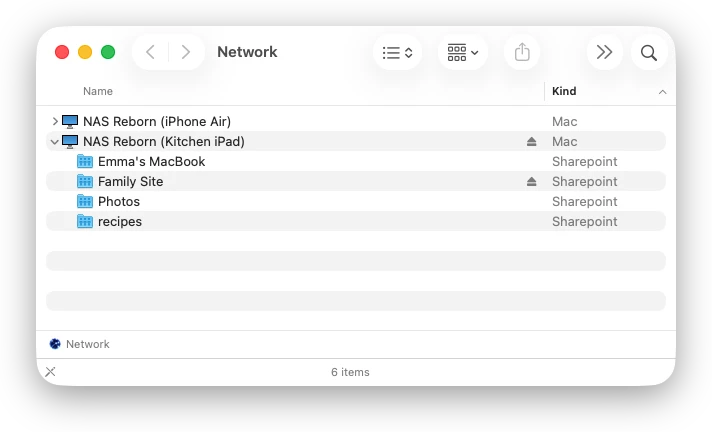
The server appears in the Finder sidebar under Network as
"NAS Reborn (model)", such as
"NAS Reborn (iPad Air 2)". Click it, choose Connect As…
and sign in with a device account, and its
shares appear under it. If
browsing does not show the server, use Go → Connect to Server… and
enter the smb://… address shown on the Share tab.
When the server itself is a Mac, macOS's own File Sharing must be off, since both use port 445. See NAS Reborn on a Mac.
Connecting from an iPhone or iPad
In the Files app on another device, tap the ⋯ button, choose
Connect to Server and enter the server's smb://… address
from the Share tab. Sign in as a registered user with the device account.
The shared folders then appear as a location in Files.
Connecting from Windows
The server announces itself and appears in the Network view of
Windows Explorer. You can also type its address on the form
\\NAME directly into the Explorer address bar. The Share tab
shows the exact name and a plain \ip-address alternative
for when the name does not resolve. Sign in with the device account.
What is shared
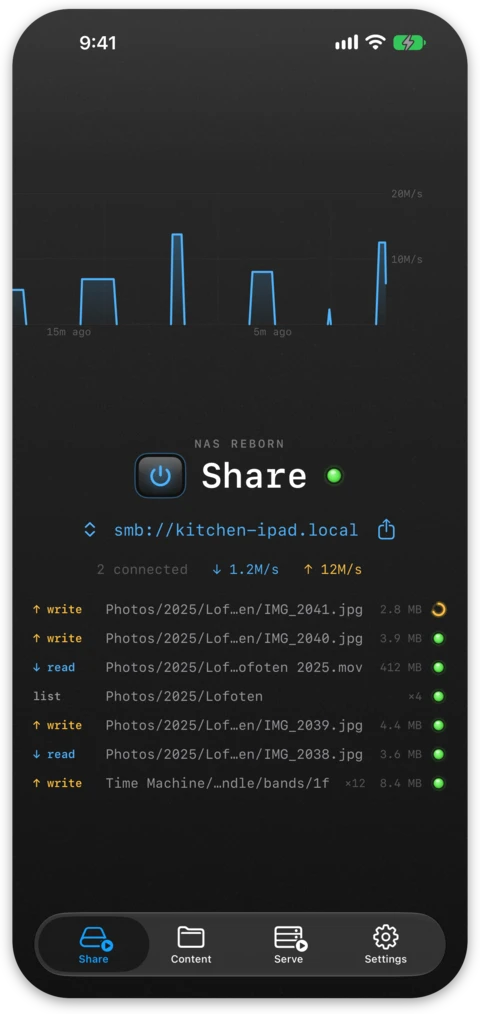
Every served top-level folder in the tree appears as a share with the same name, alongside a "Time Machine" share for backups. Folders switched Off disappear from the drive. Git repositories are shares like any other folder and hold the checked-out files, so a push from your laptop changes what the Finder shows. An account narrowed to part of the server sees its own shares, and the rest stay both unlisted and closed to it. You can customize the server's name as it appears on the network in Settings, with Pro.
The Share tab shows how many connections are open and how much data is moving, and you can copy its addresses or send them with the share sheet. When someone signs in with a wrong username or password, the Share tab points this out and offers the fix.
Security
Connections use modern SMB 2 and 3 with mandatory signing, and encryption when the client supports it. Every connection signs in with a device account, and a guest login does not exist. SMB is still a protocol meant for a trusted home network: