All topics
The network drive
Files and websites
Cameras and sensors
Hosting a Backup
This is the other half of backup, where your device keeps someone else's. You create a vault, cap its size and hand over an invitation, and from then on their device deposits encrypted snapshots into it on its own schedule. What is inside stays unreadable to you, and hosting costs nothing, with or without Pro.
Creating a vault
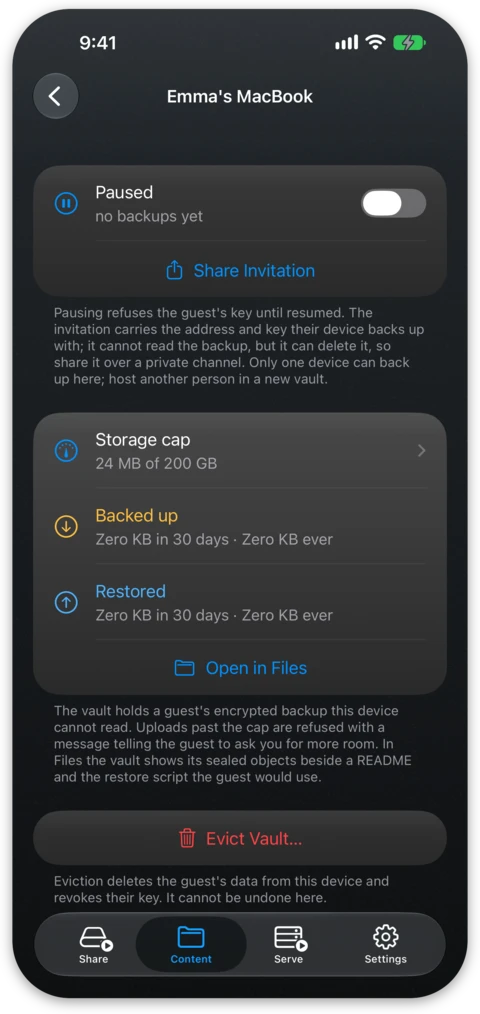
On the Content tab, choose New backup target… and give it a name, usually the name of the person, such as "Anna". Set the storage cap and pick where the vault lives, either in internal storage or in a folder on an external drive. Use a drive when you can, as the backup of someone else is usually far bigger than the internal storage of an old phone. Vaults are listed in their own section of the content list, apart from your own folders, and the screen of a vault shows how much of the cap is in use and what was backed up and restored in the last 30 days.
The invitation
Share Invitation produces a short message carrying everything the other device needs, which is the address, the access key of the vault and the cap. Sent with Mail it carries a subject line. The link inside opens a page explaining the app to someone who does not have it yet, and on a device with NAS Reborn installed the button on that page opens the invitation in the app, ready to add. The credentials ride in a part of the link that never travels in a web request.
The invitation cannot read the backup, but anyone holding it can delete it or fill the space, so you should share it over a private channel such as AirDrop or Messages.
The vault takes only backups. An upload that is not shaped like a sealed backup file is refused, so the key cannot turn your device into ordinary storage for an S3 tool, and a stray upload from an S3 browser cannot damage what is already there.
One vault belongs to one device. The first device to back up claims it and a second one is refused with a message saying so. To host another person, create another vault.
What you can and cannot see
The screen of the vault shows how much is stored against the cap and when the guest last backed up. The objects inside are sealed with keys your device has never seen, so the app, the network drive and S3 all show the same opaque blobs, without file names, folder structure or readable content. As a host you see the rough total size, the number of objects and when uploads happen. Beside the sealed objects the vault folder holds a plain-text README and the small script the guest would use to restore without the app, neither of which can read anything on its own.
Caps, pausing and eviction
Uploads past the cap are refused with a message telling the guest to ask you for more room, and raising the cap is one field on the screen of the vault. The Paused switch refuses the key of the guest until you turn it off, which is useful when the vault sits on a drive you need to unplug. Evict Vault deletes the data of the guest from your device and revokes their key. This cannot be undone here, but the guest keeps their originals and only needs a new home for their backup.
Hosting is free
A vault does not count against the folder or storage limits, so a friend can install the app and keep your backup without buying anything. Backing up your own server is the other side of this, see Backing Up Your Server.
Being reachable
The device of the guest can only deposit backups while yours is serving, so keep the app in front as described in Always-On Serving, or simply running when the host is a Mac. The guest's backup finds your device wherever the two of you are: at its address when that is reachable from the Internet, and otherwise over a direct connection the two devices open between your networks, which works with the Serve tab on LAN too. An invitation created before your device had its own address works on your own network alone; send a new one once the address shows on the Serve tab. A few pairs of networks cannot connect directly, mostly two mobile connections without IPv6. A backup that cannot reach your device waits and tells its owner that it is falling behind.