All topics
The network drive
Files and websites
Cameras and sensors
Reaching Your Server
On your own network the server always works. Whether the wider internet can reach it depends on your connection, and NAS Reborn finds out by probing your server from outside and showing you the result.
At home: always
Every device on your network can use the server, whether that is the network drive in Finder, Files and Windows, a browser, or a computer running rclone. The server announces itself on the local network, and with the Serve tab switched to LAN its hostname resolves to its local address, valid HTTPS included.
From the internet
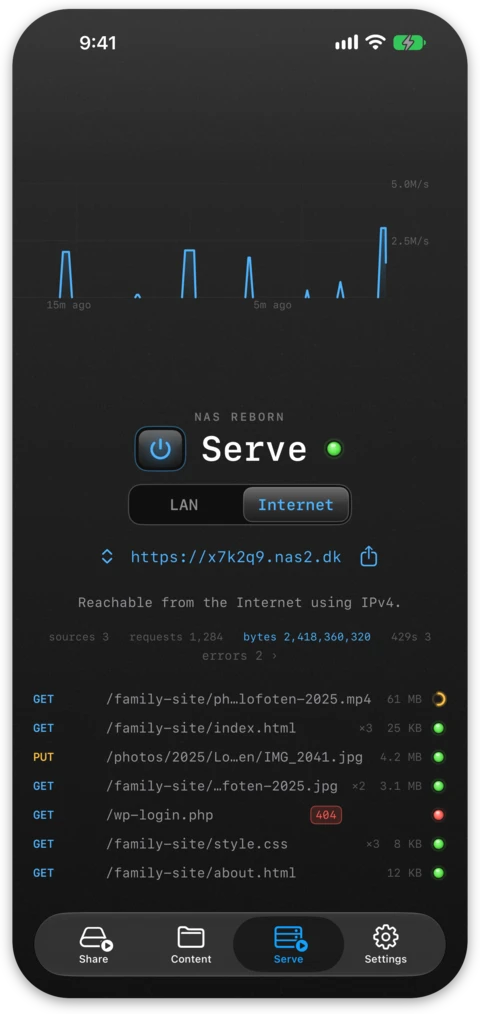
To accept visitors from outside, something has to allow inbound connections through your router. NAS Reborn tries each of these in order, verifies the result from the outside and reports it on the Serve tab, switched to Internet:
- IPv6. Many home connections have it and there is no address sharing to fight, so it often works right away. Some routers block inbound IPv6 by default and need a firewall setting.
- Automatic port mapping. The app asks your router to open a port, speaking both NAT-PMP/PCP and UPnP so most home routers are covered, and keeps the mapping alive while serving. When it works, it needs no settings from you.
- Manual port forwarding. This is the reliable fallback on routers that support neither. You forward external TCP port 443 to the address and port the app shows you. Router menus differ, but the app gives you the exact values to enter and verifies the result afterwards.
The Serve tab keeps score with a simple light that is green when the outside probe reaches the server, yellow while checking and red when nothing works. When nothing gets through, a Get help button appears below it, and a smaller question mark when only IPv6 works. Either one opens a live checklist showing each step, the public address, DNS, the port mapping of the router, and each port and address family probed, so a failure points at the step that broke. When the admin page of the router can be detected, the app links straight to it.
When nothing gets through
Some providers, including most mobile networks and a growing number of home ISPs, put customers behind carrier-grade NAT. Your router has no public address of its own, and a port cannot be opened on an address you do not have. When there is no usable IPv6 either, unsolicited visitors cannot reach the device and the reachability screen tells you so.
Behind carrier-grade NAT you can still use:
- everything on your own network, unchanged;
- a public IPv4 address or working IPv6 from your ISP, often a cheap or free option called "public IP" or "opt out of CGNAT";
- a VPN overlay such as Tailscale, installed on the server device and on the devices that need to reach it. The reachability screen offers this "skip the router" route directly and opens Tailscale or its App Store page.
In every case clients connect straight to your device, with no relay of mine in the middle.