All topics
The network drive
Files and websites
Cameras and sensors
Frequently Asked Questions
Which devices can be a server?
Anything running iOS 15, which means the iPhone 6s, iPhone SE, iPhone 7 and every iPhone since, the iPod touch (7th generation), and the iPad Air 2, iPad mini 4 and every iPad since, including all iPad Pro models. A device from 2014 or 2015 is plenty for sharing files. The same app also runs on any Mac with macOS 12 or later, Intel or Apple silicon, which is Macs from 2015 on; see NAS Reborn on a Mac.
Why does the app have to stay open?
iOS has no way for an app to run a server in the background indefinitely. When you switch to another app, NAS Reborn keeps serving for about half a minute, enough for a quick reply to a message or a short call, and on recent versions of iOS it carries on longer with a Live Activity that you can stop. Once that time runs out iOS suspends the app, transfers in progress drop, and NAS Reborn lets you know it stopped serving. It resumes when you open it again. To serve around the clock, keep the app in front: Always-On Serving shows how with Guided Access or Single App Mode. On a Mac the app serves in the background from the menu bar, and its window can stay closed.
Is it safe to leave an old iPhone plugged in for months?
Generally yes, as millions of devices spend their lives on a charger. An old battery held at 100% for months wears and can swell, and the battery guidance recommends a smart plug that cycles charging for that reason. Keep the device out of direct sun, and the app itself eases off the camera when the device runs hot.
Does my data or traffic pass through your servers?
No. Clients connect directly to your device, and you hold no account with me.
Every install makes two optional contacts, both anonymous: a small check with
nasreborn.com for known security problems affecting your app version, and usage
statistics sent to TelemetryDeck, which count that the app launched and that
it was installed for the first time. The statistics are those two counts, and
in test versions also the kind of network the server is on, as a category.
They say nothing about what the server holds or who reaches it. Both are on by
default and each has a switch in Settings. Beyond those, my backend does a few
small jobs: it assigns your nas2.dk hostname the first time the app runs with a
connection and relays the challenge for its certificate, keeps the DNS
records of that hostname pointed at the device from then on, probes
reachability from outside when web serving starts and when the network
changes, and passes on addresses for the
network relay while you have it switched on and
for backups you host while you host them. A
domain of your own gets its
certificate without the backend, as Let's Encrypt validates it by
connecting to the device itself. The
privacy policy covers everything the app sends and
to whom.
Do the camera and microphone ever run on their own?
No. Neither is touched until you set something up that needs it. A camera feed starts capturing when a viewer opens it and stops when the last viewer closes the page, at the latest about twenty seconds after the last one leaves. With Watch for changes on, it keeps running to look for movement, and with Audio on, it records sound along with the video. The microphone listens while a page you serve reads the noise level, for as long as that page is published rather than only while somebody looks at it. Each second of sound becomes one loudness number in dB, kept as history so a page can chart it, and the audio itself is discarded. That number is a sensitive reading like a motion sensor, since hours of quiet say whether anyone is home, so a public folder serves it only with Serve sensitive data turned on. The video and the readings go from your device to whoever you let connect to it.
What does it cost?
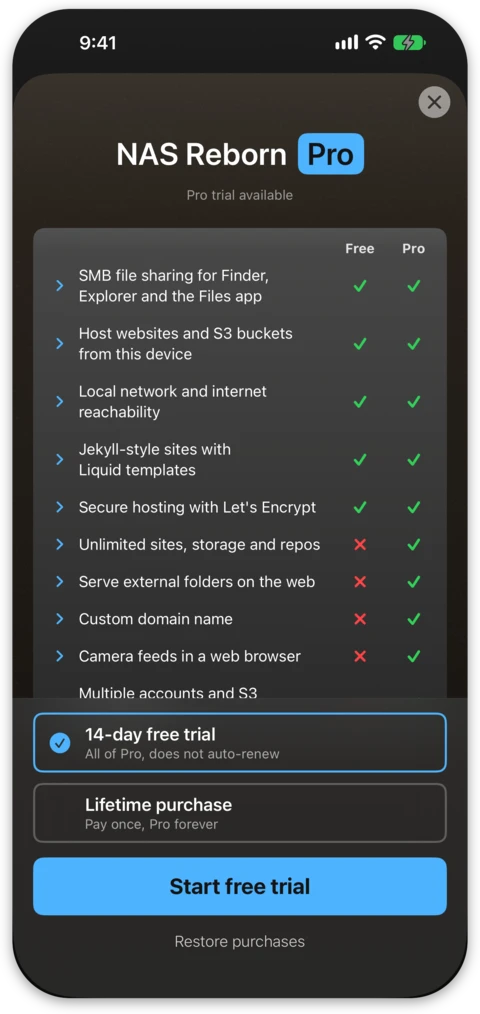
NAS Reborn starts with a 14-day free trial of everything, and after that a free tier keeps serving. The free tier gives you the network drive, Time Machine, and web and S3 serving with a hostname and certificate, within limits of 2 served folders with 5 GB of serving each, 2 git repositories, one device account and one access key. Sensor data is not limited, and the Time Machine folder does not count against the folder limit. The full app is a one-time purchase rather than a subscription, and it removes the limits and adds camera feeds, serving external drives on the web, a custom domain, the network relay, static site export and a custom share name.
What happens at the free tier's limits?
Your files stay where they are. A folder over its serving limit stops serving over web and S3 until it is back under the limit, while SMB and Files-app writes to it carry on, so Time Machine backups keep growing. Turning on more folders than the free tier serves pauses SMB as well as web and S3 for your folders, Time Machine included, until one is switched off, and more repositories than it serves pause git. Folders and repositories are counted separately, so hosting a repository does not use up a folder. Every byte remains an ordinary file in the Files app where you can copy it out. Camera feeds need Pro entirely, so on the free tier they keep their settings and serve nothing. Clips already recorded stay downloadable from their Changes page, and buying Pro resumes serving.
How do I back up my server?
The app backs itself up, to another NAS Reborn device or to any S3 bucket such as Backblaze B2, Wasabi or AWS. Add a destination in Settings → Backups and paste the invitation the other device gives you, or enter bucket credentials by hand, and it uploads on a schedule from then on. Backups are encrypted before they leave, so the device or the bucket holding one cannot read it, and each run leaves a snapshot rather than a mirror, so deleting a file today does not take it out of the snapshot from yesterday. One destination is free, backing up to several is Pro, and a restore works without Pro. See Backing Up Your Server for the whole story and Hosting a Backup for keeping a backup for a friend.
The server is also a standard S3 endpoint, so any S3 tool can pull from it
instead. A scheduled rclone sync from any computer makes a solid backup, see
the rclone section of Access Keys and S3 Clients.
iCloud Backup does not cover the served files. The app leaves them out of the device's iCloud backup, so served data needs one of the backups above.
What if the NAS Reborn backend shuts down?
NAS Reborn comes from the developer of Working Copy, in continuous development since November 2014, and Secure ShellFish, since June 2019, but nobody can promise that a service runs forever. If the backend goes away, everything on your own network keeps working, and so does a custom domain on the internet.
| Keeps working | Stops working | |
|---|---|---|
| Server | your files, network drive, Time Machine, web and S3 serving, git, camera feeds, sensors | any of these reached through nas2.dk or STUN |
| Domains | the .local name, a custom domain |
nas2.dk, when your internet address next changes |
| Certificates | the self-signed one for .local, a custom domain's Let's Encrypt certificate and its renewals |
the nas2.dk one, within three months as it can no longer be renewed |
| From outside your network | IPv6, automatic port mapping on your router, manual port forwarding | STUN, the network relay, the reachability check |
| Backups | to an S3 bucket or another NAS Reborn device, and restoring | the same as for the server |
| Security advisories | the check for your app version | |
| Pro | your purchase, which stays with your Apple Account |
Can I run more than one server?
Yes. You install the app on each device and every one runs as an independent server with folders, accounts and keys of its own, so a drawer full of old iPhones, and the old MacBook next to them, can become several servers.
Can other people in the house use it without installing anything?
Yes, through the network drive. The Finder, Connect to Server in the Files app and Windows Explorer all speak SMB as they come, and a browser reaches public folders as websites and single files from private folders through presigned links made in an S3 app. To put the S3 side into the Files app, S3 Files adds the server as a location in Files and Finder.